Data loss seems to be an inevitable issue in the digital age. The most common cause is us. We all accidentally deleted essential chats on Facebook Messenger. A misplaced tap may remove meaningful conversations.
Losing meaningful Messenger conversations can be stressful, whether due to accidental deletion or other reasons. Fortunately, there are still ways to recover deleted Messenger data, even for chats that seem to be gone forever. This guide provides five effective methods to recover deleted Facebook Messenger messages on your iPhone.
Whether you can successfully restore your deleted messages on Messenger depends on various factors. Generally, the recovery relied heavily on how the messages were deleted and what actions you had taken beforehand. You often have a big chance to recover deleted/lost Messenger conversations.
If you had archived the messages, previously downloaded your Facebook data, or have a suitable backup on your iPhone, your recovery chances will be significantly higher.
There are several common ways to retrieve lost Messenger chats. You can select the preferred solution and follow the related steps to start your message recovery. These methods are available for new iPhone models like iPhone 17/16/15/14/13, iPad Pro/Air/mini, and the latest iOS 26.
Facebook Messenger has an archiving feature that hides conversations from your primary inbox. When you can’t find some messages and think they are deleted, you should check the Archived chats first. Sometimes, your Messenger messages have simply been archived.
Open the Messenger app, tap your profile picture, and then choose Archived chats. When you find the hidden conversation, swipe left on it and tap Unarchive. Archived messages will be moved back to your main inbox.

To quickly find and restore your “deleted” Messenger messages, you can also tap the Search bar at the top and then tap the name of the person or keywords from the conversation you are looking for. If the conversion was only archived, it should appear in the search results.
Facebook enables you to download a copy of your data, including Messenger messages. If you have deleted important messages, try restoring them from your downloaded Facebook data.
Open the Facebook app or visit the official website. Tap or click your profile picture and select Settings & privacy > Settings. Click on Your Facebook information, then choose Download your information.
Select your desired Date Range and Format. Click Create File and let Facebook prepare your file. Once you notice that your Facebook data can be downloaded, download and unzip it. After that, go to the “messages” folder to recover deleted Messenger messages.

If possible, you can ask the person you were chatting with for a copy of the messages. This is the simplest method to retrieve deleted Messenger messages. If the other person doesn’t delete your chats, these messages should remain in their Messenger app.
If you can’t find and restore your Messenger chats with the methods above, you should turn to a professional iPhone data recovery tool like the reputable FoneLab iPhone Data Recovery. For messages that are not available through Facebook’s download information or have been permanently deleted, professional data recovery software offers the most powerful solution.
 100% Secure. No Ads.
100% Secure. No Ads.
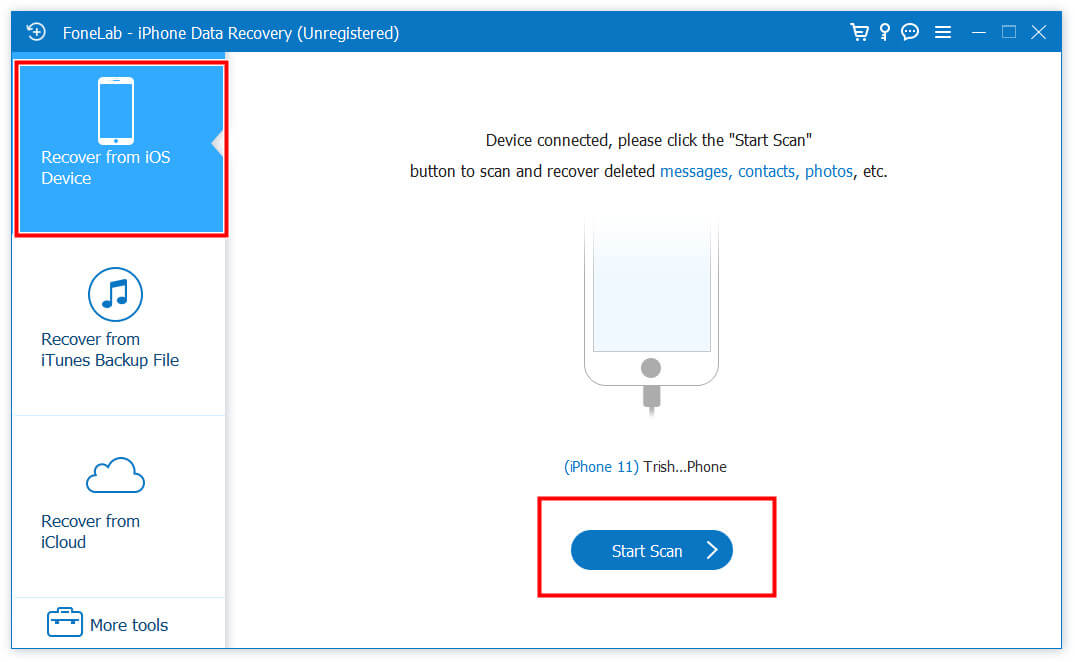
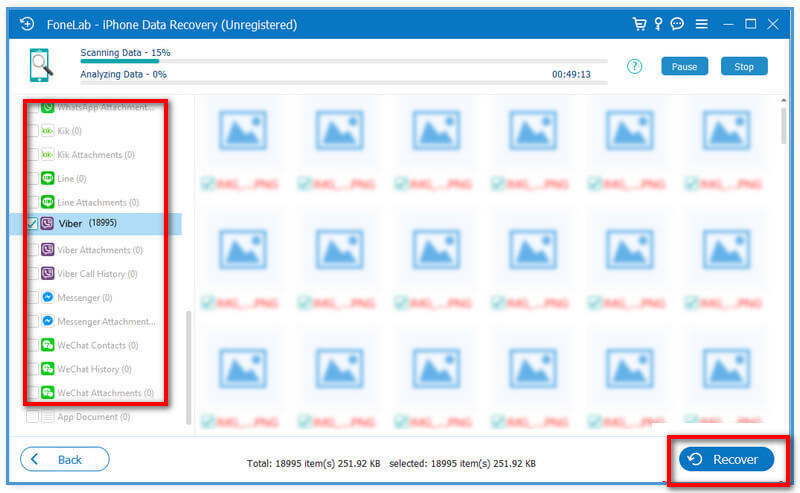
As you can see, FoneLab can also help you restore deleted Facebook photos, retrieve WhatsApp data, and recover other iOS files, including contacts, videos, notes, and more.
If you often back up your iPhone to iCloud, you can restore it from a suitable backup created before you deleted the Messenger messages.
This operation will erase newly created data after the backup. This means you will lose all messages, photos, videos, and other files created or received after that backup was made. Before restoring, you should ensure you have a recent backup of your iPhone data and settings.
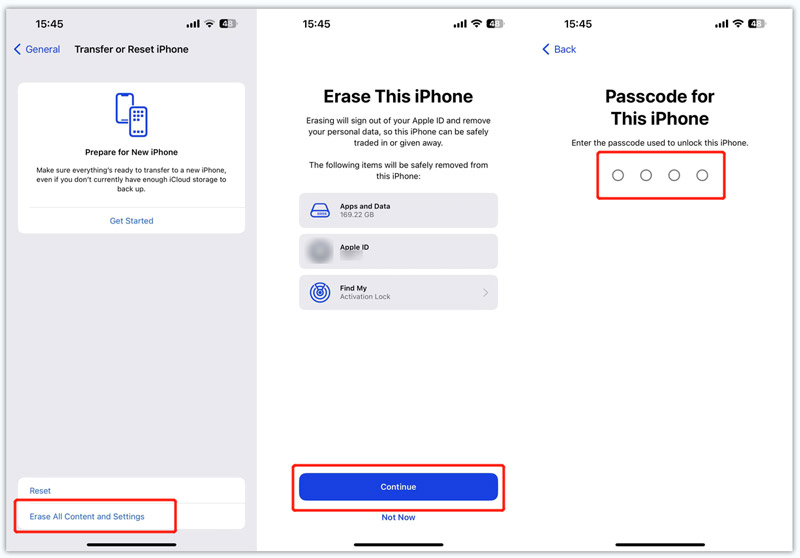
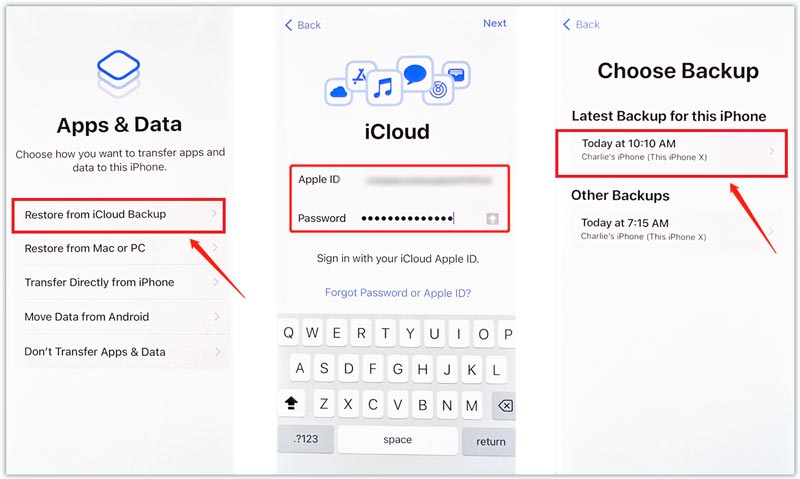
Note: Facebook Messenger messages are mostly stored on Facebook’s servers. Whether deleted chats can be restored from an iCloud backup depends on whether those messages still existed on your device at the time the backup was created.
Conclusion
You can learn five helpful methods to recover deleted Facebook Messenger messages. Even though losing your valuable data can be a disconcerting experience, you have a big chance to get it back using the solutions in this guide. To ensure all your valuable files are protected, you should regularly download your Facebook data and set your iPhone to create iCloud backups automatically.
 How to Recover Deleted Facebook Messages by Default & Alternative Ways
How to recover deleted Facebook messages? We have found the seven ways you can recover or retrieve deleted messages from Facebook and gain access to it again!
 2 Ways to Recover Contacts from Facebook Messenger on Your iPhone
Want to recover contacts from Facebook Messenger app due to the deletion or other reasons? Here you can get 2 ultimate ways to get your deleted Facebook contacts back without a backup.
 Complete Tutorial to Recover Deleted Videos from Facebook Safely
This article will show you basic and effective ways to rescue lost or deleted videos from Facebook. You can find and recover deleted Facebook videos without data overwritten here. Just read and check.
 Leave your comment and join our discussion
Recover Deleted Data on iPhone
Recover Deleted Facebook Messages Recover Facebook Messages on Android Recover Facebook Messages on iPhone Delete Facebook Messages Block Facebook Messages Send Facebook Messages Check Facebook Other Messages
The best iPhone data recovery software ever, allowing users to safely recover lost iPhone/iPad/iPod data from iOS device, iTunes/iCloud backup.
100% Secure. No Ads.
100% Secure. No Ads.

*Required field
*Please enter a valid email